



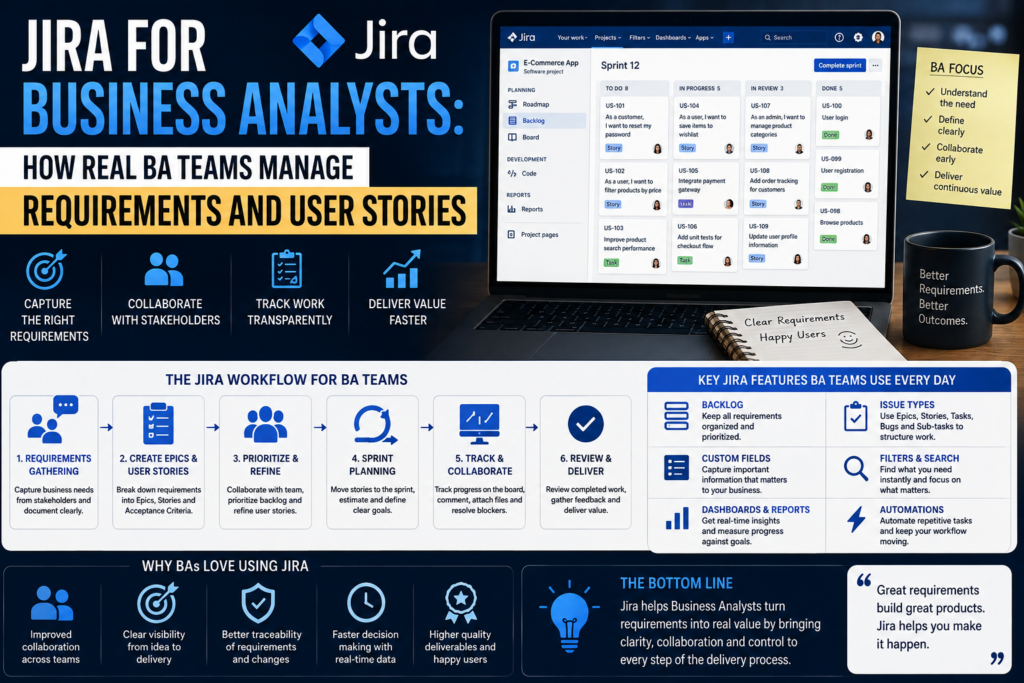
Jira for Business Analysts is no longer a “nice to have” tool sitting on the side of a project it has become the default workspace where requirements are written, refined, challenged and delivered. Whether a Business Analyst (BA) is working on a banking platform, a government portal, or a retail app, the chances are their entire day happens inside Jira. This guide breaks down exactly how real BA teams use Jira for Business Analysts to manage requirements, structure epics, and write user stories that developers and testers can actually build and verify against.
Why Jira for Business Analysts Has Become the Industry Standard
Jira, built by Atlassian, started life as a bug tracker but has grown into the backbone of Agile delivery for thousands of organisations. For a Business Analyst, Jira for Business Analysts means one connected system for requirements gathering, backlog grooming, sprint planning and reporting instead of requirements living in a Word document that nobody opens after week one. Because Jira supports Scrum boards, Kanban boards, custom workflows and integrations with Confluence, BAs can move a requirement from a stakeholder conversation to a developer-ready ticket without re-typing it five times. This single source of truth is exactly why BABOK-aligned practices around requirements traceability and stakeholder communication translate so naturally into Jira.
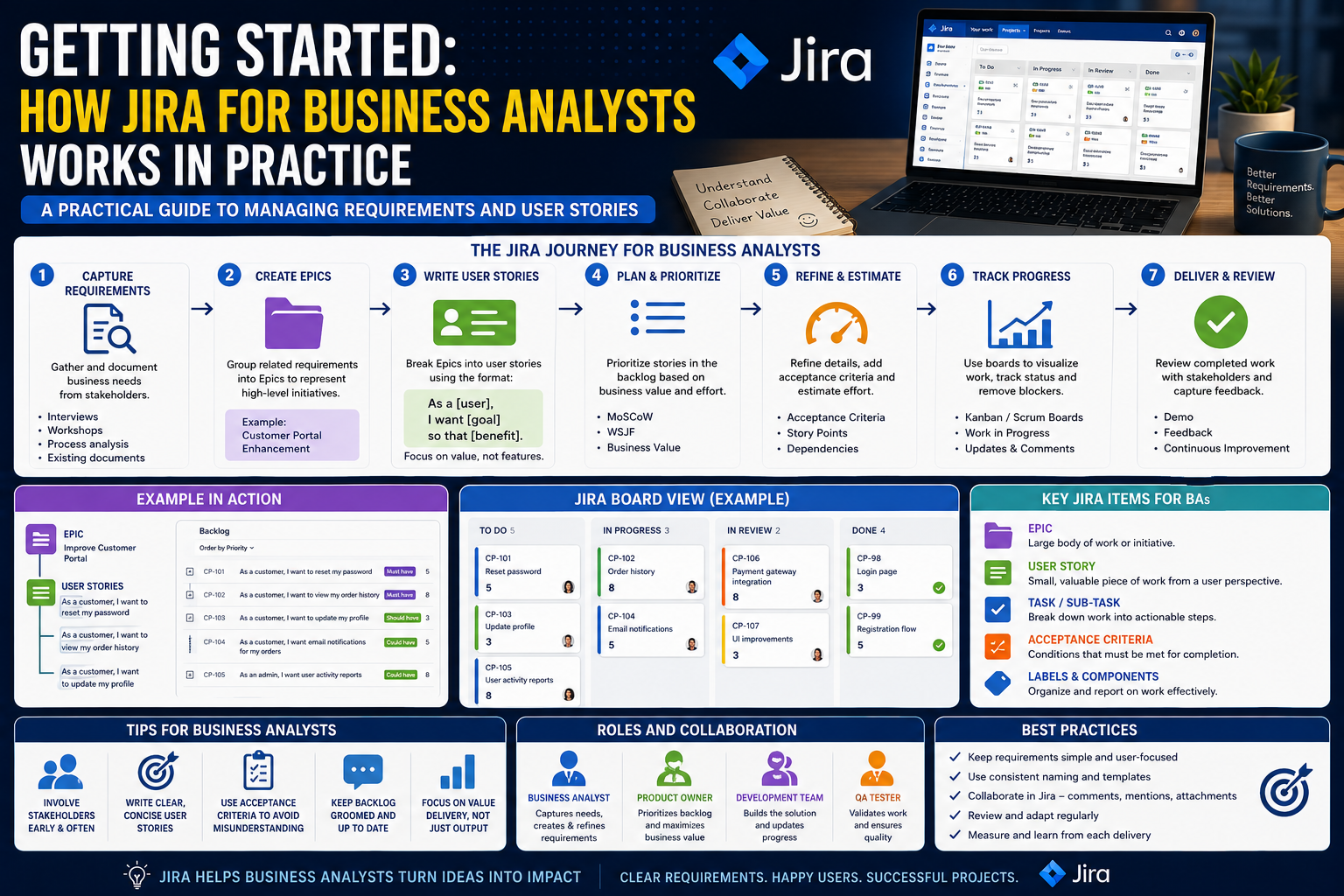
Getting Started: How Jira for Business Analysts Works in Practice
Projects, Epics and the Backlog
Every Jira project starts with a backlog — a prioritised list of everything the team might build. A Business Analyst’s first job in Jira is usually to group related requirements into Epics: large bodies of work such as “Customer Onboarding” or “Loan Application Redesign”. Epics give stakeholders a plain-English view of scope, while giving the BA a container to hang smaller pieces of work underneath.
From Epics to User Stories
Once an epic is created, the BA breaks it down into User Stories small, testable pieces of functionality written from the end user’s perspective. This is where most of a Business Analyst’s Jira time is actually spent: interviewing stakeholders, translating vague requests into structured stories, and sequencing them so developers always have a ready, well-understood backlog to pull from each sprint.
How Real BA Teams Write User Stories in Jira
The Anatomy of a Strong User Story
Most BA teams follow the classic format: “As a [user], I want [goal], so that [benefit].” Good Business Analysts using Jira for Business Analysts also apply the INVEST criteria — stories should be Independent, Negotiable, Valuable, Estimable, Small and Testable. Jira’s custom fields let a BA capture the user role, priority, story points and linked epic all in one ticket, so nothing gets lost between the requirements workshop and the sprint board.
Acceptance Criteria and Definition of Done
Every user story a BA writes in Jira should include clear acceptance criteria the specific, testable conditions that must be true for the story to be considered complete. Many teams use the Given/When/Then format inside the Jira description field, which doubles as a starting point for QA test cases. Pairing this with a team-wide Definition of Done keeps requirements consistent even as multiple BAs and developers touch the same backlog.
Requirements Traceability in Jira for Business Analysts
Traceability is one of the biggest reasons enterprise BA teams insist on Jira for Business Analysts rather than spreadsheets. By linking user stories back to their parent epic, and linking epics to business requirements documented in Confluence, a BA can prove during an audit, a compliance review, or a stakeholder demo exactly why a piece of functionality exists and who asked for it. Jira’s “linked issues” and “Epic Link” fields, combined with labels and components, let a Business Analyst filter the entire backlog by regulation, business unit, or release without maintaining a separate tracking sheet.
A Real-World Example: How One BA Team Manages Requirements
Picture a Business Analyst team supporting a bank’s mobile app rebuild. The Lead BA creates an epic called “Digital Onboarding v2” and runs a two-day workshop with compliance, design and engineering stakeholders. Every requirement raised in that workshop becomes a Jira ticket the same afternoon, tagged to the epic, estimated by the team, and prioritised in the backlog. This same pattern repeats across BA teams working out of Melbourne, Sydney, Brisbane, Perth and Adelaide the tool and technique stay identical even though the industry and stakeholders change from banking to government to retail.
Jira Add-ons Every Business Analyst Should Know
- Confluence integration — link requirements documents directly to epics and stories.
- Xray or Zephyr — turn acceptance criteria into traceable test cases without leaving Jira.
- Structure by Tempo — manage large, multi-team backlogs in a spreadsheet-style hierarchy.
- Jira Product Discovery — capture and prioritise early-stage ideas before they become epics.
- Miro or Lucidchart integration — map user story flows and journey diagrams alongside the backlog.
Best Practices for Business Analysts Using Jira
- Keep epics business-outcome focused, not technical, so stakeholders can read the backlog too.
- Write acceptance criteria before the story enters a sprint, not after development starts.
- Use consistent labels and components so requirements stay filterable at scale.
- Groom the backlog weekly — stale stories are the biggest source of scope confusion.
- Attach wireframes, screenshots and process maps directly to the Jira ticket.
Common Mistakes BA Teams Make in Jira (and How to Avoid Them)
The most frequent mistake is treating Jira for Business Analysts as a task tracker rather than a requirements tool stories get created with a one-line title and no acceptance criteria, forcing developers to chase the BA mid-sprint. A second common mistake is skipping the Epic Link, which breaks traceability the moment a project grows past a handful of stories. Finally, many BA teams under-use Jira’s reporting: burndown charts and epic reports can flag scope creep weeks before it becomes a delivery risk, but only if the backlog is kept clean and current.
How to Learn Jira as a Business Analyst
Learning Jira is straightforward on your own, but learning to write requirements and user stories the way experienced BA teams do takes structured practice. A Business Analysis course gives you hands-on exposure to writing epics, user stories and acceptance criteria the way real project teams work — not just how to click around Jira’s interface. Courses such as the Agile Business Analysis Foundation and the Business Analysis Techniques course both cover requirements elicitation and Agile backlog management in depth, and are taught by trainers who have run BA teams in real Jira environments.
Training is available in person or online, with local classes for BAs based in Melbourne, Sydney, Brisbane and Perth. If you want to see how other BAs are tackling Jira, requirements and Agile delivery, the Business Analysis Courses blog is updated regularly with practical, real-world guides like this one.
FAQs: Jira for Business Analysts
Do Business Analysts need to know how to code to use Jira?
No. Jira is a no-code tool Business Analysts only need to understand how to structure epics, stories and workflows, not write software.
Is Jira better than Confluence for requirements?
They work together: Confluence holds detailed requirements documents and process notes, while Jira tracks the actionable epics and user stories linked back to those documents.
What Jira certification should a Business Analyst get?
There’s no dedicated “BA” Jira certification, but pairing Atlassian’s free Jira training with a recognised Business Analysis or Agile Business Analysis course gives a much stronger, employer-recognised skill set.
How is a user story different from a requirement?
A requirement describes what the business needs; a user story is the Agile format a BA uses inside Jira to break that requirement into a small, testable, developer-ready piece of work.
Final Thoughts
Jira for Business Analysts is ultimately about discipline, not software features: clear epics, well-written user stories, honest acceptance criteria, and a backlog that stays trustworthy sprint after sprint. Teams that master this consistently deliver faster and with far fewer requirements-related defects. If you want to build these skills properly rather than learning by trial and error on a live project, explore Business Analysis Courses Australia or get in touch with a course advisor to find the right course for your city and experience level.